
If you’ve ever looked at the monthly bill for Cursor Pro, Claude API credits, GPT-4 API tokens, and Gemini Advanced all at once — and quietly closed your laptop — you are not alone. AI-powered coding is genuinely changing the way developers build software, but the dirty secret is that running all these tools the way the pros do on social media gets expensive, fast.
Enter Proxima — a free, open-source MCP (Model Context Protocol) server that bridges your existing ChatGPT, Claude, Gemini, and Perplexity subscriptions directly into your coding tools like Cursor, VS Code, and Windsurf. No API keys. No extra billing. Just the accounts you already have.
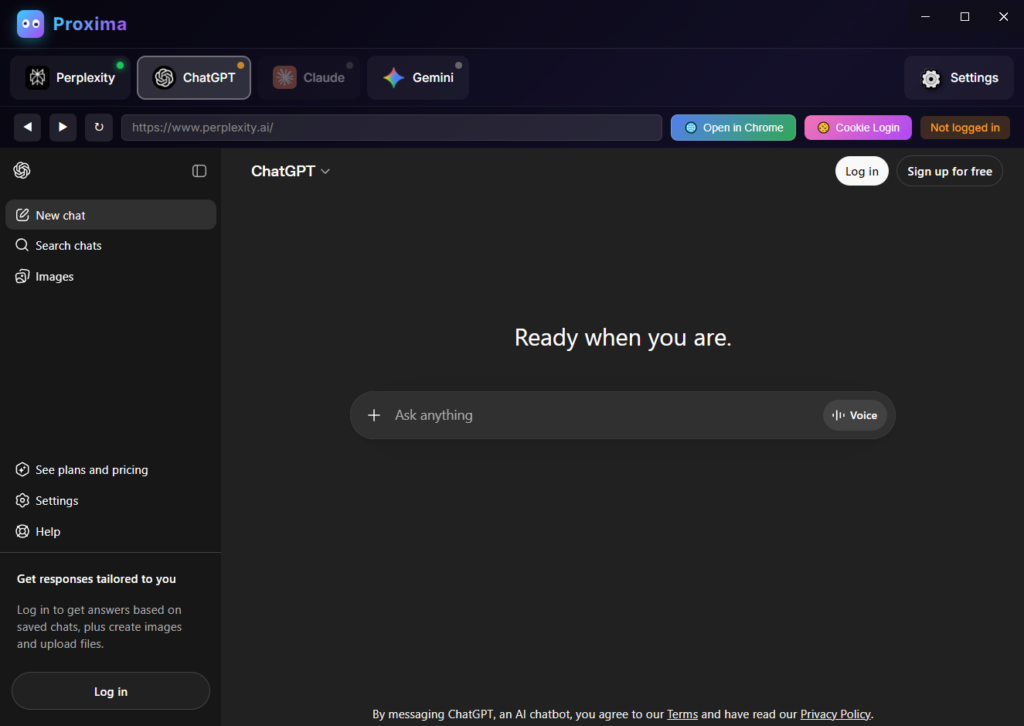
What Even Is Proxima?
Proxima is an open-source Multi-AI MCP Server that runs locally on your machine and acts as a smart gateway between your AI accounts and your coding environment. The idea is elegantly simple: instead of paying separately for API access to OpenAI, Anthropic, Google, and Perplexity, Proxima logs into your existing web accounts using a local browser session and routes your queries through them — completely free of API charges.
Think of it like a local traffic controller that sits between your editor and four different AI models, routing requests to whichever model is best suited — or all of them at once. Since everything runs on localhost, your data never leaves your machine.
textYour Editor (Cursor / VS Code)
        ↓
   Proxima MCP Server (localhost)
        ↓
┌──────┬──────┬────────┬─────────────┐
│ GPT-4│Claude│ Gemini │ Perplexity  │
└──────┴──────┴────────┴─────────────┘
The v4.1.0 Release: What’s New
The freshly released Proxima v4.1.0 is a major upgrade that brings some genuinely exciting capabilities to the table.
- All 4 AIs running faster — optimized concurrency so ChatGPT, Claude, Gemini, and Perplexity respond quicker in the “antigravity” multi-model mode
- CLI agent support — you can now connect Claude Code and Gemini CLI directly, unlocking terminal-native agentic workflows
- Real-time internet — live web search baked into the pipeline reduces hallucinations on current events and libraries
- Full context mode — larger, more coherent context windows across all providers mean smarter, less forgetful code generation
45+ Tools You Actually Want
One thing that sets Proxima apart from a simple proxy is the sheer depth of its MCP toolset — over 45 tools covering the full developer workflow.
Here are some standout tools grouped by use case:
Search & Research
deep_search— comprehensive multi-source web searchacademic_search— pulls scholarly papers and documentationnews_search— live news for keeping your dependencies current
Code Intelligence
generate_code,debug_code,optimize_code,review_codeexplain_code— great for vibe coders learning as they buildverify_code— checks against best practices automatically
Multi-AI Superpowers
ask_all_ais— fires the same prompt at all four models simultaneouslycompare_ais— puts their answers side-by-side for yousmart_query— auto-selects the best provider for a given task
Utility
analyze_file,summarize_url,fact_check,translate,brainstorm
All of these are available inside your editor without ever leaving VS Code or Cursor.
Who Is This Actually For?
The Vibe Coder on a Budget
The vibe coding movement — using natural language and AI to build real software without writing every line yourself — has exploded in 2025–2026. Tools like Cursor, Windsurf, and Claude Desktop are everywhere on developer Twitter and YouTube. But the expensive part isn’t the tool — it’s the AI model access underneath it.
If you already pay for a ChatGPT Plus ($20/mo) or Claude Pro ($20/mo) subscription for everyday use, Proxima lets you route that subscription’s power into your coding workflow without a single extra dollar in API costs. That’s the whole game changer here.
The Professional Developer
Even senior engineers juggling multiple AI tools will find the compare_ais and ask_all_ais features genuinely useful for architectural decisions, code reviews, and research tasks. Getting four different AI perspectives on a tricky bug or system design question — in seconds, inside your editor — is a workflow upgrade regardless of budget.
💸 How Much Money Does Proxima Actually Save You?
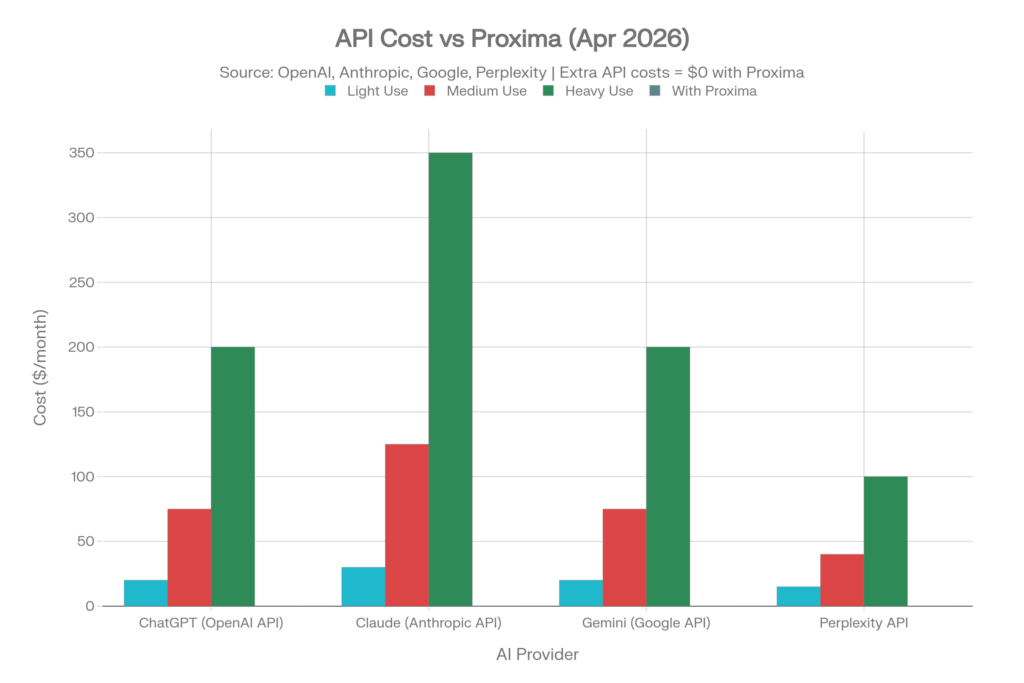
Here’s the part that will make you put down your coffee. The savings from using Proxima aren’t marginal — for many developers, they’re hundreds of dollars a month. Let’s break it down properly.
The Real Cost of Doing It the “Official” Way
Most vibe coders who want to integrate AI into their workflow assume they need API access — separate from their chat subscriptions. And that’s where the costs explode. According to current 2026 pricing:
| AI Provider | Chat Subscription | API Cost (Light Dev) | API Cost (Medium Dev) | API Cost (Heavy Dev) |
|---|---|---|---|---|
| ChatGPT (OpenAI) | $20/mo (Plus) | ~$20–30/mo | ~$75/mo | ~$200+/mo |
| Claude (Anthropic) | $20/mo (Pro) | ~$30–50/mo | ~$125/mo | ~$350/mo |
| Gemini (Google) | $19.99/mo (Advanced) | ~$20/mo | ~$75/mo | ~$200/mo |
| Perplexity | $20/mo (Pro) | ~$15/mo | ~$40/mo | ~$100/mo |
| With Proxima | Your existing sub | $0 extra | $0 extra | $0 extra |
The Stacking Problem
The sneaky thing about AI coding costs is that they stack. A developer who wants to use all four models through their editors — to compare answers, switch between providers, or run the ask_all_ais feature — would realistically be looking at this monthly bill:
- Chat subscriptions alone (all 4 providers): ~$80/month
- Add API access for all 4 at medium use: ~$315/month extra
- Total “proper” setup: ~$395/month
With Proxima, that same multi-model setup costs:
Just your existing subscriptions — $0 in API fees.
If you already pay for even one of these subscriptions for everyday use, Proxima turns it into a full coding co-pilot. For developers in countries like Pakistan, India, or across Southeast Asia and Africa where dollar-pegged API fees hit disproportionately hard, this isn’t just a convenience — it’s the difference between access and no access.
The Free Tier Rotation Strategy
Here’s a power move that Proxima makes uniquely possible: rotating across free tiers. Each provider offers a genuinely useful free plan:
- ChatGPT Free — GPT-4o mini access with daily limits
- Claude Free — Claude 4.6 access (~10–15 messages/session)
- Gemini Free — Gemini 2.5 Flash with 32K context
- Perplexity Free — web-grounded answers with limited Pro queries
By connecting all four free accounts through Proxima and letting the smart_query tool auto-route to whichever model has headroom, a zero-budget developer can cycle through limits across providers and effectively keep coding with AI throughout the day — completely free.
Annual Savings at a Glance
| Developer Profile | Without Proxima (API) | With Proxima | Annual Saving |
|---|---|---|---|
| Solo vibe coder (1 model) | ~$40/mo | $0 extra | ~$480/yr |
| Indie hacker (2 models) | ~$115/mo | $0 extra | ~$1,380/yr |
| Freelancer (all 4 models) | ~$395/mo | $0 extra | ~$4,740/yr |
| Free tier rotator | $0 | $0 | $0 (full AI access) |
That $4,740/year figure is not hypothetical — it’s what a developer currently pays when they stack API access across all four providers at realistic medium usage. Proxima eliminates that line from the budget entirely.
Getting Started in 4 Steps
Setup is refreshingly simple, and you’re up and running in under 10 minutes.
- Download the installer from the GitHub Releases page (Windows 10/11 installer available)
- Log in to your AI accounts inside Proxima (ChatGPT, Claude, Gemini, Perplexity)
- Copy the generated MCP config JSON from the Settings panel
- Paste the config into Cursor, VS Code, Windsurf, or any MCP-compatible client and start building
json{
  "mcpServers": {
    "proxima": {
      "command": "node",
      "args": ["path/to/mcp-server-v3.js"]
    }
  }
}
That’s it. No .env files. No API key dashboards. No billing alerts at 3am.
The Catch? (Being Honest Here)
No tool is perfect, and Proxima is worth evaluating honestly:
- Windows-first for now — the installer targets Windows 10/11; macOS/Linux users may need to run from source
- Account ToS grey area — using web sessions programmatically may sit in a grey zone with some providers’ Terms of Service; use at your own discretion
- Rate limits still apply — you’re using your subscription’s web-tier limits, not unlimited API access, so heavy power users may still hit caps
- Local dependency — it requires Node.js and runs as a local server, so it’s not a zero-setup cloud tool
The Bigger Picture
What Proxima represents is part of a broader shift in how developers access AI. The MCP (Model Context Protocol) standard, pioneered by Anthropic, is rapidly becoming the USB-C of AI tooling — a universal connector between AI models and developer environments. Proxima sits right at that intersection and democratizes it brilliantly.
For developers in regions where dollar-denominated API pricing is genuinely painful — or for students, indie hackers, and solo founders who simply can’t justify stacking five AI subscriptions — Proxima is one of the most practically useful open-source releases of 2026.
Check it out on GitHub → github.com/Zen4-bit/Proxima and watch a full multi-AI build demo on YouTube.
💬 Are you already using Proxima or another multi-AI setup in your coding workflow? Drop your setup in the comments — we’d love to feature reader workflows in a follow-up post.

Related Posts

Don’t Return Your Office Laptop Without Doing This First — A Complete Data Sanitization Guide
OpenClaw 2026: Features, Use Cases, Alternatives & Setup Guide