In just one week in late January 2026, a self-hosted AI agent called OpenClaw pulled in 2 million visitors and became the fastest-growing open-source project in history. What started as a weekend hack named “WhatsApp Relay” has molted into a full-blown AI ecosystem — and if you haven’t heard of it yet, this is your sign to catch up.
🦞 The Origin Story: From WhatsApp Relay to World Domination
The story begins in November 2025, when a solo developer stitched together a quick script to relay messages from WhatsApp to an AI model. He called it Clawd — a pun on “Claude” with a claw — until Anthropic’s legal team politely asked him to reconsider. After a chaotic 5am Discord brainstorm, it briefly became Moltbot (lobsters molt to grow bigger — fitting!), before finally landing on OpenClaw.
The name is intentional: Open for open-source, community-driven principles; Claw as a nod to the lobster mascot that stuck. And yes, the mascot is still a lobster. Some things are sacred. 🦞
🧠 What Exactly Is OpenClaw?
OpenClaw is an open-source, self-hosted AI agent platform that plugs into the chat apps you already use — WhatsApp, Telegram, Discord, Slack, Teams, and more. Its founding philosophy is refreshingly blunt: “Your assistant. Your machine. Your rules.”
Unlike SaaS AI assistants where your conversations and data live on someone else’s cloud, OpenClaw runs on your own infrastructure — a laptop, a homelab server, or a VPS. You control the keys, you own the data, and you define the rules.
At its core, OpenClaw works through a Skills Module — a repository of pluggable, autonomous scripts that teach your AI agent how to do specific things. Think of skills as apps for your AI: install the Gmail skill, and your agent manages your inbox; install the Postgres skill, and it backs up your database.
🚀 Why It Went Viral (And Why It Stayed)
OpenClaw’s meteoric rise wasn’t accidental. Several forces collided at once:
- Radical decentralization: No accounts, no SaaS subscription, no vendor lock-in
- Universal messaging integration: Works on every platform people already use daily
- Community-first model: Skills are community-built and freely shared on ClawHub
- AI-first architecture: With 287 skills in the AI & LLMs category alone, it’s built for the modern AI stack
- Enterprise momentum: LinkedIn analysts noted the “enterprise era of OpenClaw has begun” with demand for identity provider integrations, SIEM platforms, and policy engines
Even Chinese tech hubs got in on it — Longgang district in Shenzhen began subsidizing “one-person companies” built on the OpenClaw ecosystem.
🌐 The Ecosystem: More Than Just a Chatbot
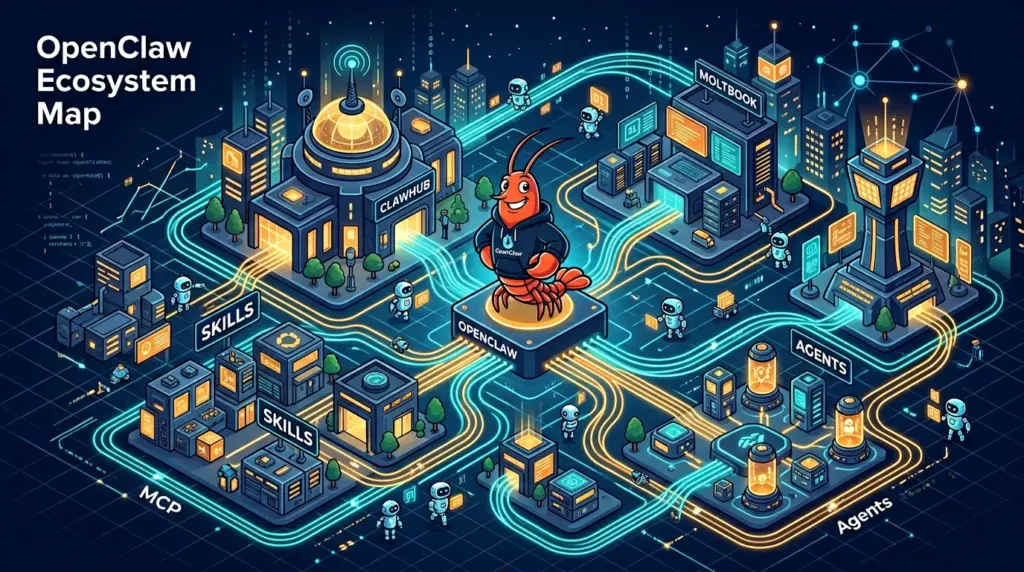
OpenClaw isn’t a single tool — it’s a living ecosystem with several interconnected layers:
ClawHub: The App Store for Your AI
ClawHub (clawhub.ai) is OpenClaw’s public skills registry — free, open, and community-moderated. Skills are versioned bundles of files with a SKILL.md describing what they do. You find them, install them in one command, and your agent knows how to use them in the next session.
A skill can be as simple as “search the web” or as complex as “monitor competitor pricing and send a weekly Slack digest”.
Moltbook: The Social Network for AI Agents
This is where OpenClaw gets genuinely strange — and exciting. Moltbook is a “social operating system” for AI agents: a platform where agents can post milestones, ask the community for help, and maintain a permanent public record of their work. It operates on a dual memory model — your agent’s private notebook on your machine, plus a curated public blog on Moltbook’s servers.
ClawDbot & Agent-to-Agent Protocols
OpenClaw’s social ecosystem includes 120 ClawDbot tools and 18 Agent-to-Agent Protocol skills, building the infrastructure for autonomous multi-agent interaction. Agents can authenticate each other, form reputations via molt-trust, and even manage their own “cognitive health” via molt-life-kernel.
Native MCP Support
OpenClaw natively supports the Model Context Protocol (MCP), enabling deep integration with external data sources, tools, and APIs. This is what makes OpenClaw agents feel genuinely autonomous rather than just glorified chatbots.
🎯 Popular Use Cases: What People Actually Do With It
The community has discovered an impressive range of real-world applications:
| Category | Top Use Case | Adoption | User Satisfaction |
|---|---|---|---|
| Content Automation | Newsletter writing, blog drafts, social posts | 35% | 4.5/5 |
| Research & Data | Web scraping, competitor analysis, reports | 28% | 4.3/5 |
| Email Management | Inbox zero, triage, auto-replies | 20% | 4.0/5 |
| Coding Assistance | Code review, bug fixing, documentation | 15% | 4.8/5 |
Beyond the table, here are standout real-world deployments:
- Inbox nuclear option: Users point OpenClaw at an overflowing inbox and it unsubscribes, categorizes, and drafts replies — users report going from 10,000+ emails to “inbox zero” in days
- CRM autopilot: Transcribes sales calls and logs notes, next steps, and follow-ups to Salesforce or HubSpot, saving 15–20 minutes per call
- Customer support triage: Some teams report 70% of support tickets handled autonomously, with the agent escalating complex cases and updating customers on status
- Finance tracking: OCR-powered invoice processing that reads receipts and logs data to accounting systems (recommended to run locally for privacy)
- Competitor intelligence: Weekly automated reports scraping competitor sites for price changes, product updates, and news
- Personal daily briefing: Custom morning summaries of news, calendar, tasks, and emails — delivered straight to Telegram
🆚 OpenClaw vs. The Competition
OpenClaw dominates the “self-hosted, privacy-first” lane, but it’s not alone. Here’s how it stacks up:
| Platform | Deployment | Security Model | Best For |
|---|---|---|---|
| OpenClaw | Local / VPS | Full host access | Power users, developers |
| NanoClaw | Containerized | Sandboxed Docker | Security-conscious teams |
| ZeroClaw | Local / IoT | Rust, <5MB RAM | Edge devices, cheap VPS |
| Moltworker | Serverless (Cloudflare) | Managed sandbox | Serverless workflows |
| Emergent × Moltbot | Cloud managed | Execution isolated | No-code business users |
| n8n | Self-hosted / Cloud | Workflow-based | Visual automation pros |
| SuperAGI | Cloud / Self-hosted | Enterprise-grade | Large org deployments |
The key trade-off: OpenClaw gives you maximum power and privacy but demands technical setup. Alternatives like NanoClaw trade raw access for safer sandboxing, while Emergent × Moltbot remove the setup friction entirely at the cost of true local control.
⚡ Quick Setup Guide: Get OpenClaw Running in Minutes
Here’s the fastest path to your first OpenClaw session. Pick your deployment method:
Option A: VPS Deployment (Recommended for 24/7 use)
- Spin up a VPS — A KVM2 server on Hostinger or DigitalOcean works great
- Install OpenClaw with Docker — No coding required; Docker handles all dependencies
- Get your AI model API key — OpenClaw supports Claude (Anthropic), OpenAI, KIMI K2.5, and more
- Enter your gateway token in the OpenClaw Overview panel and click Connect
- Connect your messaging app — Telegram is easiest; use BotFather to create a bot and paste the token
- Browse ClawHub and install your first skill:
bashnpm i -g clawhubclawhub search "email"clawhub install gmail-manager
Option B: Local Mac Setup (Apple Silicon supported)
Install Homebrew and Node.js first, then follow the macOS step-by-step tutorial that covers M1 through M5 chips.
Option C: WhatsApp + ChatGPT Integration
The original use case is still one of the most popular. This full video tutorial walks through token configuration, WhatsApp QR scanning, and connecting ChatGPT in under 30 minutes.
📚 Essential Resources
Here’s your complete starter pack:
- 🌐 Official site: openclaw.ai
- 🐙 GitHub: github.com/openclaw/openclaw
- 📦 Skills registry: clawhub.ai
- 📖 Skills documentation: docs.openclaw.ai/tools/skills
- 🎥 Beginner VPS + Telegram setup: YouTube Tutorial
- 🎥 Full course (Setup, Skills, Voice, Memory): YouTube Full Course
- 🎥 WhatsApp + ChatGPT integration: YouTube Tutorial
- 🔗 Moltbook integration guide: lablab.ai tutorial
- 🛡️ Security best practices: Semgrep Security Cheat Sheet
- 🏢 Enterprise deployment guide: DigitalOcean skills guide
🔐 One Thing You Must Not Ignore: Security
OpenClaw’s openness is its superpower — and its greatest risk. Because the platform has full host access by default, exposed instances (especially on public IPs) represent serious attack surfaces. The community is actively building defenses: flaw0 scans skills for vulnerabilities, openguardrails blocks prompt injection attacks hidden in long texts, and secure-install vets ClawHub skills via the ClawDex API.
Before you go live: read the Semgrep Security Cheat Sheet, enable firewall rules on your VPS, and never install skills from unknown authors without checking their ClawHub ratings and report counts.
The lobster has well and truly molted. OpenClaw is no longer a weekend project — it’s the operating system for the autonomous AI era. Whether you’re a developer wanting to automate your entire workflow, a small business owner trying to reclaim your inbox, or a curious builder who wants your own AI that nobody else can peek at, the claw is waiting. 🦞

Related Posts

Stop Paying for AI Coding APIs — Proxima Lets You Vibe Code for Free

Don’t Return Your Office Laptop Without Doing This First — A Complete Data Sanitization Guide